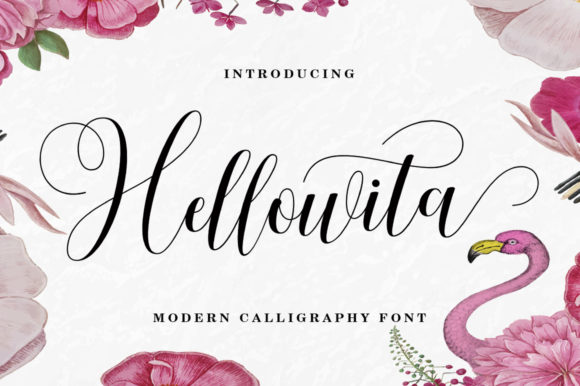
Hellowita: A Script Font That Elevates Editorial Design
When it comes to editorial design, the right typeface can transform a simple layout into something memorable and engaging. Hellowita, a modern script font from Script Amp, offers a delicate balance of elegance and approachability that makes it an excellent choice for bloggers, publishers, and content creators looking to enhance their visual storytelling.
The Visual Charm of Helloworld
Hellowita is designed with a light, flowing structure that exudes contemporary charm without sacrificing clarity. Its fabulous swashes add a touch of sophistication, while the clean lines and open apertures ensure it remains legible even at smaller sizes. This makes it ideal for use in headers, pull quotes, and other typographic elements where a sense of warmth and professionalism is desired.
The personality of Hellowita lies in its subtle details—each letterform feels handcrafted yet consistent, making it perfect for content that benefits from a personal or artistic touch. It’s not overly ornate, which helps it maintain a modern feel suitable for both digital and print formats.
Editorial Applications for Hellowita
Hellowita shines in editorial contexts where visual hierarchy and tone are key. Here’s how you can leverage this premium script font across your publishing projects:
- Blog Headers: Use Hellowita for blog post titles or section headers to create a welcoming and stylish entry point for readers.
- Magazine Covers: The font's graceful curves make it a strong candidate for cover text, especially when paired with minimalistic backgrounds or photography.
- Ebook Titles and Chapter Openers: Hellowita adds a soft but impactful presence to ebook front matter and chapter headings, helping guide readers through the narrative flow.
- Newsletter Graphics: For quote cards, featured article headers, or themed sections within newsletters, Hellowita brings a creative edge that stands out without overwhelming the reader.
- Printable Guides and Lead Magnets: Whether you're designing a wedding planning checklist or a wellness worksheet, Hellowita can help establish a friendly and professional aesthetic.
Setting the Mood and Tone
In editorial design, typography plays a crucial role in setting the mood. Hellowita is particularly effective in content that aims to be warm, inviting, and visually appealing. It works well for lifestyle blogs, fashion magazines, and personal branding projects where a handwritten font feel is appreciated but must remain polished and professional.
Its style supports a range of moods—from playful to refined—depending on how it's used. For instance, using Hellowita in a recipe ebook can evoke a sense of creativity and care, while in a coaching workbook, it might suggest a more personal, one-on-one learning experience.
Where to Use Hellowita Most Effectively
While Hellowita is versatile, it excels as a display font rather than a body typeface. Here are some specific applications where it performs best:
- Titles and Headlines: Its bold presence makes it perfect for grabbing attention on page or screen.
- Subtitles and Pull Quotes: When used sparingly, Hellowita can highlight key messages without disrupting the reading rhythm.
- Cover Text: The font’s elegance suits book covers, zines, and magazine fronts that aim to stand out.
- Accent Typography: Pair it with a sans serif or serif font to add contrast and depth to your layouts.
For longer blocks of text, it’s best to reserve Hellowita for decorative elements like chapter openers, title pages, or special callouts. Using it in body copy may hinder readability, especially on screens or in small print.
Font Pairing Tips for Editorial Projects
One of the strengths of Hellowita is its ability to complement other fonts effectively. To maintain readability and visual harmony, consider pairing it with a clean sans serif font such as Lato or Montserrat for captions, navigation menus, or body text. Alternatively, a readable serif like Merriweather or Playfair Display can offer a classic contrast, enhancing the overall visual tone of your publication.
For example, in a digital magazine layout, Hellowita could headline a feature story while a neutral sans serif handles the byline and supporting text. In a printable planner, it might appear on section dividers or motivational quotes, supported by a structured sans serif for dates and schedules.
Readability Across Formats
Thanks to its balanced design, Hellowita reads well in most digital environments. When exporting to PDF or preparing for print, ensure that the font size is adequate (typically 14pt or larger) and that the background doesn’t interfere with the script’s subtlety. On mobile devices, keep the spacing generous to avoid any loss of legibility due to screen scaling.
For web-based publications or social media graphics, Hellowita works beautifully in headlines and short-form text. Just remember to test it across different browsers and devices to confirm its performance before finalizing your layout.
Commercial Use and Licensing
If you’re using Hellowita in commercial projects like paid ebooks, client publications, or branded templates, it’s essential to verify the licensing terms provided by Script Amp. Many script fonts require extended licenses for certain uses, so always check what's included if you plan to distribute your work commercially or include it in digital downloads.
Having access to multiple weights, alternates, and ligatures can also be beneficial. These options allow you to customize the look of your publication, ensuring consistency in brand identity and visual appeal across all design assets.
Real-World Examples
Here are a few practical scenarios where Hellowita could elevate your editorial work:
- Lifestyle Blog: Use Hellowita for blog post titles and sidebar headers to give your site a curated, artistic vibe.
- Wedding Guide Ebook: Apply the font to chapter titles and quote graphics to reflect the romantic and celebratory tone of the content.
- Coaching Workbook: Feature Hellowita in section headings and motivational prompts to create a personalized and encouraging feel.
- Digital Magazine Spread: Let the font headline a fashion or beauty piece, then pair it with a minimalist sans serif for captions and descriptions.
- Printable Planner: Add a touch of creativity to weekly calendars, goal-setting pages, or themed spreads using Hellowita as an accent font.
Building Brand Identity with Script Fonts
Script fonts like Hellowita are powerful tools for building a unique brand identity. They communicate a sense of individuality and artistry that can resonate deeply with audiences. Whether you're crafting a signature logo for your newsletter or establishing a cohesive look for your course materials, Hellowita provides the kind of modern typography that feels both authentic and professional.
Using a consistent script font across your content assets—like email signatures, social media posts, and website headers—can reinforce your brand's voice and make your designs instantly recognizable.
Why Choose Hellowita Over Other Script Fonts?
There are many script fonts available, but Hellowita distinguishes itself with its balance of form and function. Unlike some handwritten-style fonts that prioritize aesthetics over usability, Hellowita maintains a high level of readability, making it suitable for a wide array of editorial needs.
Its versatility allows it to fit seamlessly into both digital and print workflows. From a minimalist editorial layout to a vibrant social media graphic, Hellowita adapts gracefully without losing its character.
Final Considerations for Content Creators
As a content creator, your goal is to engage readers while maintaining a clear and attractive layout. Hellowita supports this objective by offering a stylish yet functional option for display typography. Its inclusion in your design toolkit can help you craft more compelling visual hierarchies, whether you're working on a lead magnet, a magazine spread, or a brand identity suite.
Remember to consider the purpose of each element you design. Will the font help guide the reader? Does it support the message and mood of the content? By asking these questions, you can make informed choices about where and how to apply Hellowita in your next project.